If you are a photographer searching for a website platform that finally keeps up with your creative vision, Showit is worth your full attention.
Most photography platforms force you to choose between design freedom and functionality. Showit breaks that compromise by giving you pixel-perfect design control while running your blog on WordPress, the world’s most SEO-powerful engine. In 2026, photographers who understand how to use Showit strategically are outranking competitors, booking more clients, and spending less time fighting with rigid templates.

This guide covers everything: how Showit works, what makes it exceptional for photographers specifically, how to set it up for SEO, and how to build a site that converts visitors into booked clients.
Why Photographers Are Moving to Showit in 2026
The photography industry is more competitive than ever. According to IBISWorld, the photography services market in the US continues to grow year over year, with digital presence now being the number one factor clients use to evaluate photographers before reaching out.
Photographers are no longer just competing locally. They are competing with every well-designed site that appears in a Google search. Your website is your portfolio, your pitch, your first impression, and your booking system all at once.
Showit addresses all of these demands without requiring a single line of code. The platform is built specifically for creative professionals, and photographers make up a significant portion of its user base.
What Makes Showit Different From Other Photography Platforms
Most platforms like Pixieset or SmugMug are gallery-first tools. They do photo delivery exceptionally well, but they were not designed to be full business websites. You can explore the comparison between Showit and Pixieset to see how dramatically different the two approaches are.
Showit, by contrast, is a complete website builder. You get an infinite canvas drag-and-drop editor where nothing is locked to a grid. Every element can be placed exactly where you want it. Font pairings, spacing, color systems, hover effects, animations, all of it is in your hands.
The WordPress Blog Advantage
One of the most misunderstood features of Showit is its WordPress blog integration. Your Showit website design is built in the Showit editor, but your blog runs on WordPress. This means you get the visual beauty of Showit with the SEO horsepower of WordPress.
For photographers who want to rank for location-based keywords like “Denver wedding photographer” or “Austin family photographer,” this setup is genuinely powerful. You can read a detailed breakdown of how Showit WordPress blogging works if you want to understand the technical side before committing.

Understanding the platform’s structure is step one. Next, let’s look at how to build a photography website on Showit that actually converts visitors into clients.
Building Your Photography Website on Showit: Page by Page
A photography website is not just a gallery. It is a carefully sequenced experience that takes a cold visitor and walks them through trust, desire, and action. Each page plays a specific role in that journey.
Your Homepage: The First Impression That Converts
Your homepage has one job: make the visitor immediately feel something and want to see more. For photographers, this typically means a full-screen hero image or video, a one-line value proposition, and a clear path to your portfolio or inquiry form.
The secret to designing a high-converting homepage on Showit is intentional hierarchy. You need to control where the eye goes and what action the visitor takes next. Every section of your homepage should have a single goal.
One common mistake photographers make is leading with their name instead of their client’s desire. “Capturing your love story in golden light” is more compelling than “Jane Smith Photography.” Lead with the transformation, not the business name.
Portfolio and Gallery Pages
Showit gives you complete control over how your galleries display. You can use masonry grids, full-bleed horizontal scrolls, or curated editorial layouts that feel like a magazine spread rather than a photo dump.
For embedded client galleries, Showit integrates with all major gallery delivery platforms. You can connect Pixieset to your Showit site, embed a Pic-Time gallery, or add a Cloudspot gallery directly into your pages.
If you want your portfolio gallery itself to be a powerful visual statement, Showit’s canvas gives you the tools to build stunning galleries that no template-locked platform can match.
The About Page
Clients hire photographers they connect with. Your about page is not a resume. It is a relationship starter.
Write in a warm, first-person voice that shares why you photograph, what you believe about your work, and who your ideal client is. Include a high-quality portrait photo of yourself. Pair it with personal touches: your coffee order, your favorite season to shoot, what you do when you are not behind a camera.

This page also benefits enormously from branding consistency. If your brand identity is still evolving, the branding tips for creatives guide on the Perfect Website blog is worth reading before you write a single word on this page.
Services and Pricing Pages
Transparency converts. Research consistently shows that photographers who include starting prices on their websites receive inquiries from more qualified leads. Visitors who are not a budget fit self-select out, which saves everyone time.
Your services page should clearly outline what you offer, what the experience looks like, and what clients receive after their session. Use Showit’s layout flexibility to build a page that feels premium. Clean white space, elegant typography, and strategic use of your portfolio images within the pricing section all contribute to perceived value.
If you want to go further, Showit supports building high-converting sales pages directly within the platform, giving you full control over layout and messaging for your signature packages.
The Contact Page
Your contact page is where the decision happens. Do not overcomplicate it.
A simple form with name, email, event date, and a short message field is enough. You can embed contact forms from multiple providers directly in Showit, and the guide to embedding contact forms in Showit walks you through the most popular options step by step.
After your pages are structured, the next priority is making sure Google can find and rank them.
Showit SEO for Photographers: How to Rank Locally and Nationally
Search engine visibility is where most photography websites fail. A beautiful website that no one finds is an expensive digital business card. Showit gives you strong SEO foundations, but you have to build on them intentionally.
Setting Up Your Showit SEO Basics
Before worrying about keywords, make sure your technical setup is correct. This means connecting Google Analytics, submitting your sitemap to Google Search Console, setting up proper redirects if you migrated from another platform, and ensuring your pages load quickly.
The Showit SEO setup guide for Google Analytics covers the analytics side. For Search Console, the Google Search Console setup for Showit gives you a complete walkthrough. Both are free tools and both are essential.
Keywords That Photographers Should Target

Local SEO is the highest-value strategy for most photographers. Location-based keywords like “wedding photographer in [city]” and “newborn photographer [city] [state]” tend to convert at a much higher rate than broad terms because the searcher already knows what they want and where they want it.
Blog content is how you capture these searches at scale. Writing posts about real sessions, venues you have shot at, and tips for couples planning their photography all build topical authority around your location and specialty.
The Showit SEO tips for photographers article goes deep on this strategy and includes keyword research guidance specific to the photography industry.
Page Speed and Mobile Optimization
Google’s ranking algorithm heavily weights page speed and mobile experience. Photography websites are especially vulnerable here because large image files can slow everything down dramatically.
Compressing your images before uploading, using next-generation formats where possible, and keeping your design clean rather than animation-heavy will significantly improve your load times. The Showit website speed optimization guide covers every optimization lever available to you.
Mobile layout is equally important. Showit allows you to design your mobile site completely independently of your desktop layout. That means you can restack elements, resize images, and simplify navigation specifically for phone screens. The Showit mobile layout design guide is an essential read before you publish.
Schema Markup for Photography Websites
Adding structured data to your photography website helps search engines understand your business type, location, and services. For local photographers, adding local business schema can improve how your business appears in Google search results.
The guide to adding schema markup in Showit explains exactly what to add and how to implement it without needing a developer.
With your SEO foundation in place, let’s look at how to use Showit’s design tools to stand out visually in a crowded market.
Design Features That Give Photographers a Creative Edge
Showit’s design engine is what separates it from every other website platform in its price range. Photographers are visual professionals, and Showit respects that by giving you design tools that match your creative standards.
Hover Effects and Interactive Galleries
Static image grids are forgettable. Interactive galleries with hover effects create a tactile, editorial experience that keeps visitors engaged and exploring.
Showit supports multiple approaches to hover-based gallery interactions. You can add a hover-over image gallery effect that reveals information or captions when visitors mouse over photos, or use a hover scroll effect to create a smooth scrolling experience within a contained area.
These interactions are not just visual tricks. They slow down the visitor’s experience in a good way, encouraging them to linger and engage with more of your work.
Before and After Image Sliders
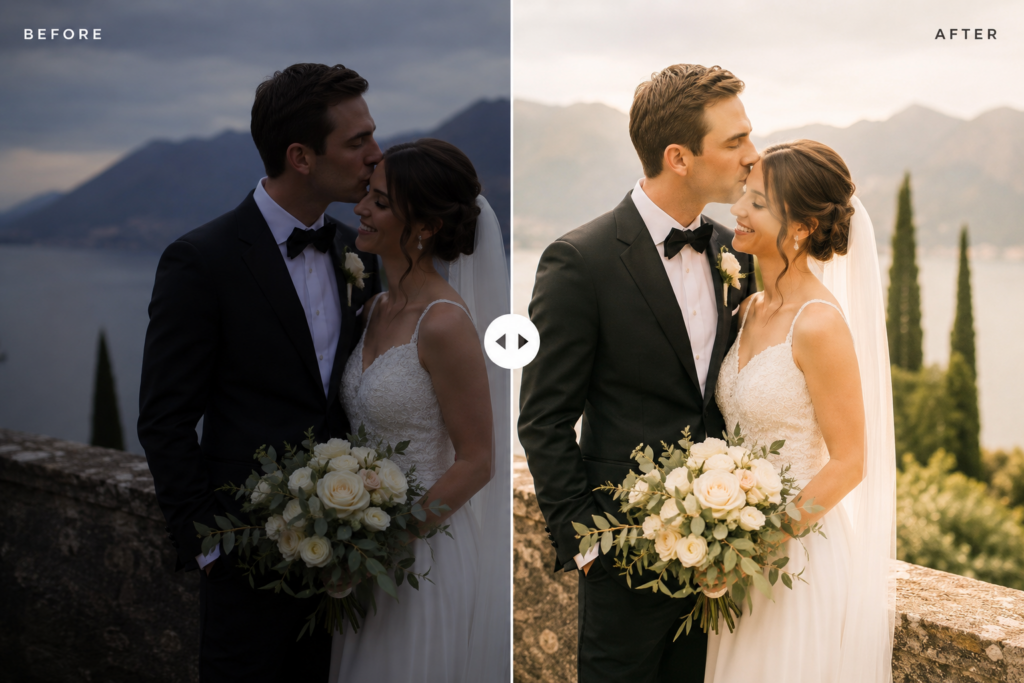
For photographers who do significant editing work or who offer boudoir, transformation, or real estate photography, the before and after slider is a powerful conversion tool.
Showing the difference between a raw and edited image, or between a dark room and a bright-styled space, creates immediate proof of your skill and value.
Image Marquee and Scroll Animations
A scrolling image strip at a steady, graceful pace has become one of the most effective ways to show volume of work without requiring a full portfolio gallery page. The image marquee code snippet lets you add this to any Showit page in minutes.
Combined with the text marquee animation for a rotating headline or testimonial strip, you can create a homepage that feels dynamic and alive rather than static.
Choosing the Right Showit Template vs Custom Build
Many photographers start with a template and customize it. Others invest in a fully custom build from the start. Both are valid paths depending on your budget, timeline, and how established your brand identity is.
The guide to choosing the right Showit template for your brand helps you evaluate templates with a critical eye. If you are ready to go custom, the Showit full custom website development service from Perfect Website offers a professionally built site tailored exactly to your brand.
Once your design and SEO are working together, it is time to think about the systems that keep your business running smoothly.
Booking, CRM, and Client Experience Integrations
A photography website in 2026 is not just a portfolio. It is the front door to your entire client experience. Showit integrates with a wide ecosystem of tools that automate and professionalize your workflow.
Booking and Scheduling
Embedding a booking calendar directly on your website reduces friction enormously. Clients do not want to email back and forth to find a time. They want to book immediately.
Showit works well with Calendly, Cal.com, Acuity Scheduling, and several other booking tools. The guide to adding a booking page in Showit covers the most popular options. For Acuity specifically, the Acuity calendar integration guide for Showit is detailed and beginner-friendly.
CRM Integration for Photographers
Managing client communications, contracts, and invoices through a professional CRM makes your business look polished and keeps you organized. Showit connects with Dubsado, HoneyBook, 17Hats, Studio Ninja, and other popular photography CRMs.
If HoneyBook is your CRM of choice, the HoneyBook client portal integration for Showit lets you give clients a seamless experience directly from your website. Studio Ninja users can follow the Studio Ninja Showit integration guide for a smooth setup.
Email Marketing Integration
Building your email list through your photography website is a long-term lead generation strategy that many photographers overlook. Adding a Flodesk form, a ConvertKit form, or a MailerLite opt-in to your site takes about fifteen minutes and can generate a consistent pipeline of warm leads over time.
The guide to adding a Flodesk form to Showit and the ConvertKit form integration for Showit are both quick reads that will get you set up without any technical friction.
Showit Pricing and What You Get in 2026
Showit operates on a monthly subscription model with plans designed around your needs. The standard plan includes the Showit builder and website hosting. The Advanced Blog plan adds the WordPress blog integration, which is what most photographers need for serious SEO.
For a full breakdown of current pricing tiers, features, and how to choose the right plan, the Showit pricing plans guide for 2026 is the most up-to-date resource available.
Compared to platforms like Squarespace or Wix, Showit is not the cheapest option. But photographers who understand the value of a high-converting, visually exceptional website consistently find the investment pays for itself in booked sessions within the first few months.
Getting Professional Help: When to Work with a Showit Designer
There comes a point where your website needs more than a template swap and some color changes. If your current site is not reflecting the quality of your work, is not showing up in search results, or is not converting visitors into inquiries, it may be time to bring in a professional.
The Showit website design service at Perfect Website is built specifically for creative professionals who need a site that works as hard as they do. From brand alignment to technical SEO to conversion optimization, the process is comprehensive.
If you are coming from another platform, the Showit migration service handles the transition cleanly, including redirects and content transfer, so you do not lose rankings or content in the move.
For photographers who need results quickly, the VIP Design Day service delivers a professionally designed, launch-ready Showit website in a single intensive day.
Conclusion
Showit for photographers is not just a website platform. It is a complete business growth tool when used with intention.
From the infinite canvas editor that respects your creative standards, to the WordPress blog engine that powers your local SEO, to the rich integration ecosystem that automates your client experience, Showit gives photographers everything they need to compete and win in 2026.
The photographers who are booking consistently are not just talented. They have websites that look exceptional, load fast, rank on Google, and guide visitors to take action. Showit makes all of that possible.
Build the website your work deserves, and your ideal clients will find you.
FAQ
Is Showit good for photographers who are not tech-savvy?
Yes. Showit’s drag-and-drop editor requires no coding knowledge. The learning curve is mild compared to platforms like WordPress, and Showit’s support team is highly responsive. Most photographers are comfortable building their own site within a few days of exploring the editor.
Can I use my existing domain with Showit?
Absolutely. You can transfer your domain to Showit or connect it from your current registrar. Theguide to connecting your domain to Showit walks you through the process step by step with no technical experience required.
Does Showit support online payments for photography packages?
Yes. You can embed payment tools from Stripe, PayPal, and other processors directly into your Showit site. Alternatively, if you use a CRM like Dubsado or HoneyBook, payments can be processed through those platforms, with your Showit site serving as the booking entry point.
How long does it take to build a Showit photography website?
A template-based site can be customized and launched in one to two weeks, depending on how much content you have ready. A fully custom build typically takes four to eight weeks. If timeline is critical, the VIP Design Day option delivers a complete site in one business day.
Can Showit help me rank for local photography keywords?
Yes, and this is one of its strongest advantages. The WordPress blog integration gives you access to Yoast SEO, full metadata control, and a blogging platform optimized for search engines. With consistent blog content targeting local keywords, photographers on Showit regularly rank on the first page for competitive terms.
Ready to build a photography website that books clients while you sleep? Explore the Showit website design service at Perfect Website and take the first step toward a site that matches the quality of your work.